Pokémon GO: 7 Essential Battery-Saving Tips You Need To Know
Leave it to the community to step in when a game falls down.

Needless to say, Pokémon GO is a bonafide global phenomenon. Social media feeds are clogging up with Magikarps popping up in kitchens, Charmanders in bedsheets and townships coming together to do battle over their local Poké-gyms. Hell, even our own 'Tips & Tricks The Game Doesn't Tell You' has become a regular read amongst many a budding Pokémon master.
That said, what can we do about the most pressing issue, the insane battery drain?
As it stands, you're likely to blast through an entire 100% charge in about 40 minutes - yes, really - which isn't the best when the game requires a constant connection, or if you need to venture across town to track down a wayward Hitmonlee.
To that end, I've scoured the internet for the finest battery-saving tips and included my own, as when developers Niantic are still trying to get the game's servers to run in its standard form, an official battery fix will be a long ways off.
--
7. Download Your Local Area Map
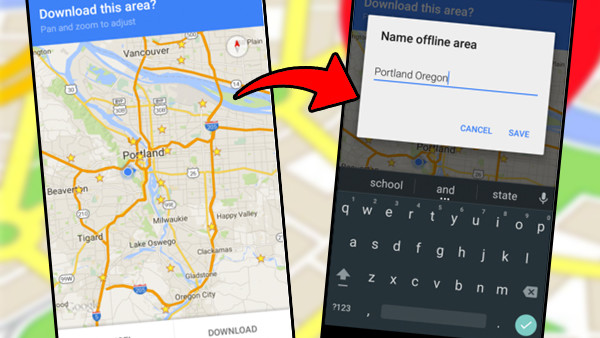
Fresh off Reddit's presses, user throwaway96388 figured out that Pokémon GO uses Google Maps' dormant data to establish the game world. As such, even though you may not have Google Maps open, the game interacts with it to populate everything just as fast.
To that end, open Google Maps, hit menu > Settings > 'Offline Maps/Areas' and hit the plus symbol. From here just download a local area map of wherever you are (it'll take a hefty chunk of data, so do it from home, work on a WiFi connection if possible).
Once this is done, close Google Maps altogether and dive back across to PoGo - the game will now use the downloaded map for all its data-centric calculations. Pokémon GO's GPS positioning tech is now connected to a far more easily-readable, offline map. Simple.
In addition, the game will run smoother as there's far less going on to compute, and early reports from Mr. 96388 state that they've been able to play up to five hours more than normal. Brilliant!
6. Turn Off The AR Option When Catching Pokémon
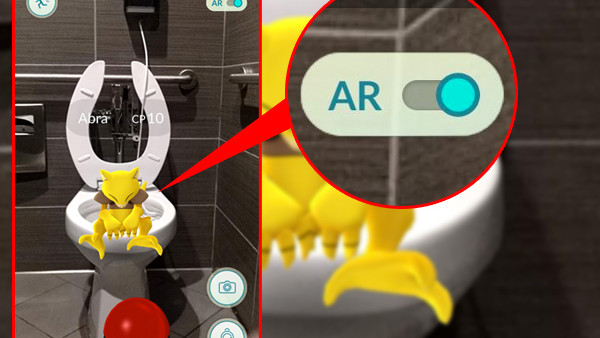
I know, I know, it's a huge part of the fun, but sadly as the app constantly has your phone's camera at the ready, should a Pokémon turn up, it takes extra battery power to activate it every time.
The option to flick AR off appears in every battle once a Pokémon is tapped to catch, so simply flick it off and it won't come back until you say.
Thankfully, the replacement screen it presents you with has a nice, TRON-like virtual reality aesthetic - as do the gym battles which default to non-AR - so it's not all doom and gloom.
5. Use And Understand The Battery Saver Option
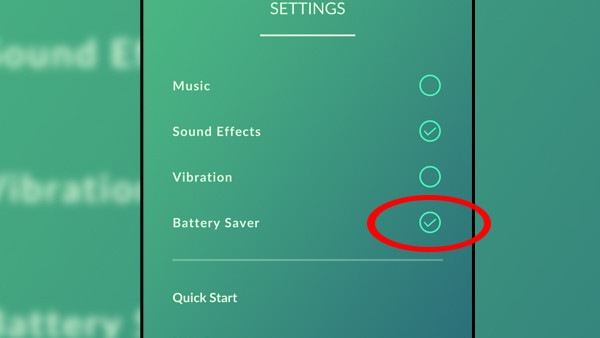
Thanks to the spectacular lack of tutorialisation in PoGo, the 'Battery Saver Option' in the settings can easily pass you by - especially seeing as triggering it, doesn't appear to do anything.
Instead, it only relates to when turning your phone upside down, the screen will turn off whilst the app stays running. This is useful for pocketing your phone and walking great distances with the app still active, as nothing actually happens or tracks if your phone is asleep.
For clarity's sake: Pokémon don't get closer to you, eggs don't hatch - nothing.
By using this method, attach headphones to your device and simply listen out; the game will make a noise when you're close to a PokéStop or if a monster has appeared in your vicinity, then you can grab your device and ready your Pokéballs!
4. Manage WiFi Effectively
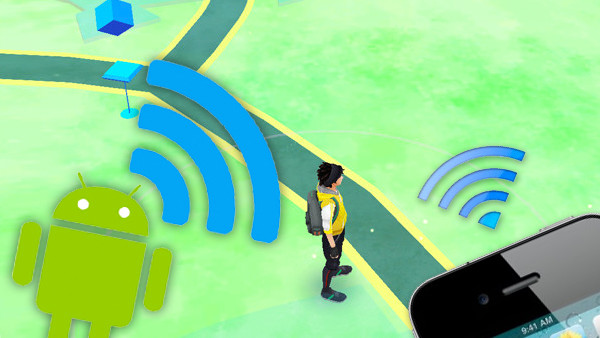
It's easy to forget that WiFi technology is something we don't need to keep activated constantly.
As such, when you're not in a spot where you can guarantee a connection, turn it off. It's true that WiFi on phones is mostly inactive when there aren't any hotspots nearby, but that doesn't stop your phone expending precious power searching for them anyway.
Once you're out in the world, mobile data takes over, so switch off your WiFi as PoGo only needs roaming data and GPS to function. Even the smallest incremental thing you can do helps in these furtive stages when the app is yet to be patched for optimisation, so check your WiFi settings, and if it's not being used, turn.it.off!
3. Learn To Bide Your Time

Due to how proximity is everything in relation to how much - and when - the surrounding world is populated, travelling 50-100 metres at a time will zero you in on a given creature, but also refreshes your 'Nearby' menu, as different Pokémon are always in the surrounding areas.
The game 'loads in' these Pokémon as you walk, but due to the immense amount of processed data at any given time, simply standing still after a bout of walking will allow various creatures to spawn in place, whilst giving your GPS and data-consumption a bit of a rest.
Think of it like interval training - walk or jog a little, then rest, then a bit more, then rest.
The life of a Pokémon Master ain't all sunshine and rainbows.
2. Lower Screen Brightness

There aren't any screen-saving options inside Pokémon GO, but hopping into your phone's main settings and knocking the slider down can sometimes give you an additional half hour (or so) of playtime.
Developers Niantic previously released the beloved Ingress, a similar alternate reality-intensive app that re-mapped our own world with portals and points of interest.
So far, many players of both that and PoGo have noted just how much of a difference in battery life their truly is, as the former can be played for hours at a time. Hopefully this indicates a fix is coming in the near future - providing Niantic get a handle on Pokémon GO's unprecedented success.
1. Quit All Background Apps

More of a tip for phone battery life in general, but background apps can contribute to battery drain, too.
In this day and age, neither Apple, Google or anyone else seems to have mastered power usage when it comes to the millions of apps we all juggle on a daily basis; which is why you're better off closing them all, constantly.
Many users already get their OCD on and fervently close any unused apps immediately, but if you're someone who just leaves them in the background, pull up that switch menu by holding/double tapping the menu key, and swipe to close everything other than Pokémon GO.
I've gotten a good couple of hours extra play out of ensuring only PoGo is running, as that negates the need for your phone to monitor anything other than the game - which is quite fitting, because as far as the world is concerned right now, there is nothing other than Pokémon GO.
--
Let us know in the comments if there are any other battery-saving tips we missed!