10 Best Easter Eggs Hidden On DVD Menus
The Joker trolls Batman fans.
There's no denying that the golden age of DVD is long over. Gone are the halcyon days where movie studios would put colossal amounts of time and effort into assembling home video releases that were absolutely teeming with content.
With DVD enjoying near-universal adoption throughout the early-to-mid 2000s, studios not only gathered immense amounts of behind-the-scenes footage for fans to salivate over, but spared no expense crafting glossy DVD menus and sometimes even including snazzy Easter eggs just for the hell of it.
Even with the enormous convenience that streaming and downloads afford film buffs nowadays, those raised in the DVD era will likely feel at least a little nostalgic for the days where picking up a movie on disc really felt like an event, especially with how common - and how awesome - Easter eggs were on hit movie DVDs.
And two decades on from the format's inception, these are among the cleverest and most unforgettable Easter eggs the medium has delivered.
Of course, if you had a half-decent DVD player it was always possible to just cheat by scrubbing through every piece of video on the disc, but where's the fun in that?
From awesome hidden gag reels and clips to new material created specifically for the DVD and even awesome new ways to view the movies, these are 10 of the most awesome Easter eggs hidden on DVD menus...
10. Spider-Man's Movie "Debut" - X-Men

On the X-Men: Special Edition DVD, there's a secret gag included where Storm (Halle Berry), Cyclops (James Marsden) and Jean Grey (Famke Janssen) are unexpectedly joined by a certain web-slinging superhero while running around the Statue Of Liberty.
During an outtake shot for the film's finale, stuntman Scott Leva is zipped into a Spider-Man suit and appears to "accidentally" stumble into the wrong movie, after which Cyclops quickly chases him off the set and everyone has a good laugh about it.
This is especially notable as the scene's release predates the first major live-action Spider-Man movie by over a year, technically giving fans their first semi-authorised look at Spidey in lifelike, big-budget action.
Curiously, Leva had also previously worn a Spidey suit to pose as a reference for the 1985 Spider-Man comic The Amazing Spider-Man #262. Neato.
How To Find It: This one's a piece of cake compared to some of the tricks on this list. From the DVD's main menu, simply select Special Features, then Theatrical Trailers, and after selecting Trailer A, press left to illuminate a flower. Finally, press enter.
9. Hip-Hop Yoda - Star Wars Episode III: Revenge Of The Sith

You can fault the Star Wars prequels for many things, but Lucasfilm's commitment to jam-packing their home video releases with as much supplementary material as possible? Absolutely not.
Nothing on any of the DVDs quite tops the utterly demented inclusion of a shockingly well-produced gag on Revenge of the Sith's home video release, where Yoda is seen rapping and dancing to The Roots' "Don’t Say Nuthin."
A gang of Stormtroopers meanwhile seem mildly engaged in the background, before the clip ends with Yoda quipping, "That voice, hard on my throat it is."
Funnily enough, the clip was produced in secret by the movie's animators, who had to hide it from their superiors until it was completed.
Originally intended to be an internal gag and nothing else, the sequence was eventually seen by George Lucas, who insisted it be included on Revenge of the Sith's DVD.
How To Find It: Enter the DVD's sound menu and highlight the distinctive THX logo. Then press 1138 on your remote - in reference to George Lucas' 1971 sci-fi classic THX 1138 - to unlock the video.
8. "Follow The White Rabbit" Mode - The Matrix

The Matrix was one of the first must-own DVD releases, and that original release is still fondly remembered by many fans for its insanely awesome DVD menu.
The disc was also loaded with behind-the-scenes extras, some of which were accessible through a unique "Follow the White Rabbit" mode.
This allowed viewers to watch the movie seemingly as usual, but nine times throughout the movie a white rabbit logo would appear in the bottom-left corner of the screen, which upon clicking would reveal an extra making-of featurette about the scene in question.
Beyond being the perfect encouragement to re-watch the movie - as if anyone needed the excuse in 1999 - it was a totally unique and brilliant endorsement of DVD's boundary-pushing capabilities.
The only problem, however, was that some early - that is, cheap - DVD players couldn't interface with this functionality, leaving some viewers unfortunately locked out of the fun.
How To Find It: Go to the Special Features menu and click "Making The Matrix", then select "The Dreamworld", hit Continue and select "Follow the White Rabbit." It's easy enough to find, but also easily missed if you don't bother to explore.
7. Hebrew Language Selection - Borat

Sacha Baron Cohen's Borat is unquestionably one of the most distinctive and iconic comedies of the century, and Cohen didn't dare let his guard down for the DVD release.
The entire menu layout has the scuzzy, low-rent aesthetic of a bootleg DVD you would've bought from a dodgy boot sale stall in the early 2000s, and those who venture into the language selection menu might stumble upon an hilarious extra gag.
Select the Hebrew language option and you'll be greeted with a troll clip where a red screen flashes up the text, "You have been trapped Jew!", "Keep your claws where they can be seen" and "Do not attempt shift your shape" while a voice repeatedly shouts "Jew in vicinity!"
How To Find It: As above, enter the language menu and pick Hebrew. Simples.
6. Willem Dafoe As Doctor Octopus - Spider-Man 2
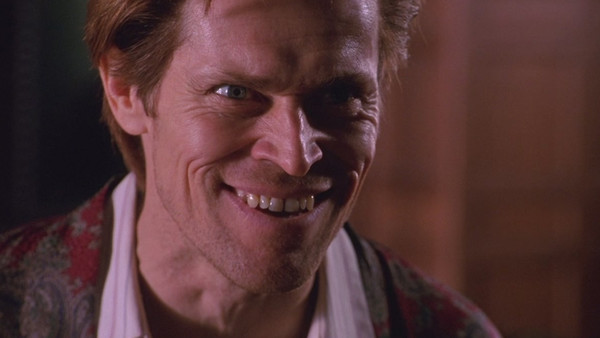
This crowd-pleasing Easter egg features a clip from the set of Spider-Man 2, where in order to provide actor Alfred Molina with some inspiration for playing Doc Ock, director Sam Raimi calls upon the assistance of a "special guest."
As Raimi walks Molina onto the set, he's greeted by Willem Dafoe - who, of course, played Norman Osborn in the first film and has a cameo in the sequel - hooked into the Doc Ock suit and riffing his own spin on the character's lines.
As brilliant as Molina's performance turned out, this was certainly persuasive proof that Dafoe could've also been a remarkable Doc Ock if things had turned out a little differently.
How To Find It: On the second disc, select the "Making the Amazing" feature and press up.
5. Play The Movie In Chronological Order - Memento

Christopher Nolan's neo-noir Memento is one of the most incredible cinematic mind-benders of the last 20 years, in large part due to its hugely unconventional narrative structure where the bulk of the movie plays out in reverse.
Included as either an Easter egg or an advertised feature in various versions of Memento's home release, viewers are able to watch the movie in chronological order and hopefully glean a little more insight from Nolan's wilfully confusing masterwork.
How To Find It: Those who own the original single-disc region 2 release can just head to the Special Features menu and wait until the words "Memento Mori" appear and fade out. Push enter after the fade and you're done.
On the various 2 and 3-disc Special Editions across regions, things are a little more complicated. You have to insert the 2nd disc where you'll be greeted by a series of image ciphers instead of conventional text navigation.
Here's a quick walkthrough: select the clock, then pick "C" on the next five pages, and finally, on the next page place the image panels in the order 3, 4, 1, 2.
4. The Panic Button - Chicken Run
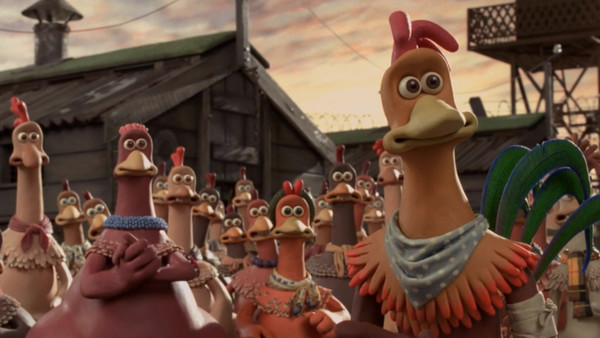
Chicken Run is the only movie on this list to feature literal eggs as Easter eggs: there are a dozen cracked eggs hidden around the DVD's menus, all of which contain neat trivia about the making of the classic animation.
But the real kicker comes with the "Panic Button" scattered among the menus. Rather than containing a featurette or more factoids about the film, pressing it simply shows one of a few random clips of the movie's frightened chickens running around haplessly screaming. Worth it.
How To Find It: It's an Easter egg designed for kids and so obscenely easy to find: stare at the main menu for more than a few seconds and you should spot it in the bottom-right corner.
3. Snap Along With Ben Stiller - Dodgeball: A True Underdog Story

Dodgeball features a bizarre spin on The Matrix's Follow the White Rabbit mode by inviting viewers to press the enter button on their DVD remote every time they see the villainous Globo Gym owner White Goodman (Ben Stiller) snap his fingers throughout the film.
If you can remember to do it for each of the four times Goodman indeed snaps his fingers, you'll unlock a gag reel and a few other clips. Nothing revelatory, but for the sheer weird randomness of it, it's worth trying out if your DVD has been collecting dust on a shelf for a good while.
How To Find It: Go to the Special Features menu and select the Globo Gym Purple Cobras logo on the bottom-right of the screen.
Upon pressing enter, you'll be greeted by a grossly overweight White Goodman congratulating you on uncovering the Easter egg, before he explains the whole finger-snapping shtick.
On that note, Marvel Studios should totally do this for the next home video release of Avengers: Infinity War.
2. A Trailer Vandalised By The Joker - The Dark Knight
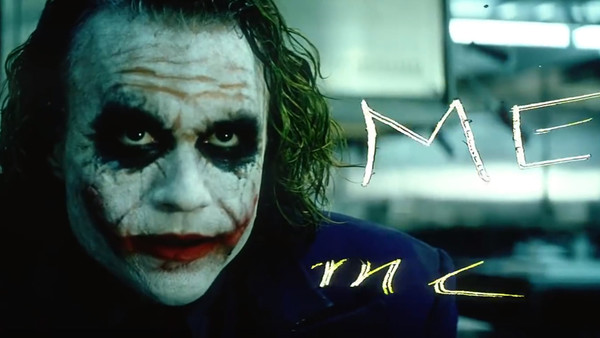
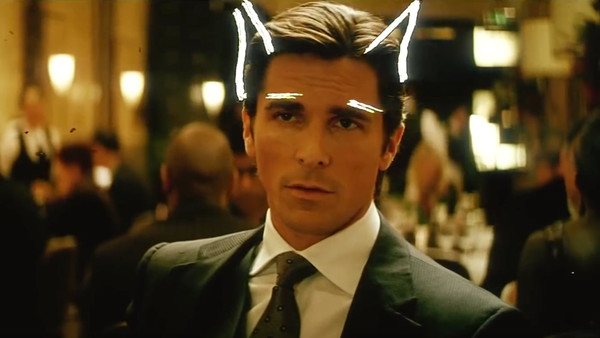
Christopher Nolan may put up a stern front, but he nevertheless allowed a cutesy gag to be included on the Blu-ray release of The Dark Knight. The clip is a trailer for the movie that has been vandalised by The Clown Prince of Crime (Heath Ledger) himself.
In addition to scribbling over the various heroes' faces with Joker makeup, writing "Boring" over Bruce Wayne (Christian Bale), "Party pooper" over Batman and referring to himself as "#1", he also adds glasses to Alfred's face and scrawls a heart over Rachel Dawes (Maggie Gyllenhaal). D'awww.
The clip also screws with the editing in a few places, de-syncing the sound, repeating clips and even rewinding part of the trailer. Oh, and The Joker defaces the movie's logo to read "The Dork Knight." Nice.
How To Find It: On disc 2, select Trailer 3, and while it's playing, type "56537" on your remote. This spells out "Joker", and after a brief pause, the defaced trailer will play.
1. So. Many. Extras. - Cloverfield

Cloverfield was a movie noted for its revolutionary approach to viral marketing in the early days of HD video streaming, and that certainly carried through to its Blu-ray release, which is crammed with a dozen supplementary videos sneakily hidden across the two discs.
These clips include the full version of a news report briefly visible during the movie, a commercial for the company Slusho! which was a pivotal part of the movie's ARG marketing campaign, various webcam videos and six behind-the-scenes clips.
For fans who got fully invested in the fleshed-out world of J.J. Abrams' monster movie, this was all pure catnip.
How To Find It: All dozen Easter eggs have slightly varying unlock methods, and you can find a full guide for them here. They're simple enough to find if you know where to look, but are also easily missed if you're not paying attention.
What do you make of these sneaky DVD Easter eggs? Got any of your own faves to share? Shout them out in the comments!