Pokémon GO: 11 Biggest Questions Answered For New Players
They're super effective.
Like grabbing a bag of Pokéballs, having a quick word with the local Professor and being on your way, Pokémon GO can be a pretty daunting experience. After all, the game's tutorials are severely lacking (read: nonexistent), prompting helpful 'Tips & Tricks' articles like this, but that doesn't get away from the fact Nintendo's latest killer app has quite the mystifying entry barrier.
Playing like an open-world version of Paper Toss, you'll journey around your own country/town/living room, triggering various Pokémon before flicking Pokéballs at them to fill up your Pokédex. There's a bit more to the game than that, and after putting a good few hours into it (and charging my phone almost constantly to keep going), I've compiled some of the most common questions from across various social media sites, forums and everything in between.
Thankfully, Pokémon's community has always been a superbly helpful one, so leave any other qualms and quibbles in the comments below, and we'll all do our best to get them answered.
Without further adieu...
-
11. How Much Battery Does It Use? What Can Prevent Drain?
"A TON", is the short answer, as right now developers Niantic are already "working on a solution" to the problem. As it stands, the game requires a constant connection both to Niantic's servers and GPS data to triangulate your position and populate the world, resulting in an entire phone's 100% charge depletingin around 40 minutes of solid play.
Yes, really.
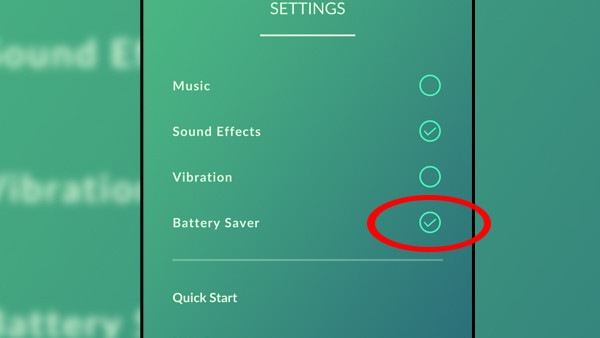
Granted you can mitigate this a tad by hopping into the settings and ticking the 'Battery Saver Mode' option. Rather than dim your screen constantly or restrict certain processes, it instead turns your screen off altogether when your phone is upside down.
The practical use involves plugging in headphones and slipping your now-upside down phone in your pocket for long bouts of play. You'll still get audio notifications for PokéStops (more on them in a bit) and Pokémon that pop up around you, so right now it's the best way to get the most time out of any session.
10. Can I Battle My Friends?
Yes you can, but not in real time.
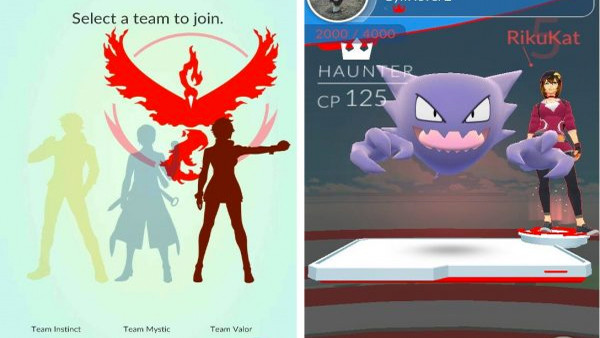
See, PokéGO relies on the idea of 'Gyms' to draw players together. You visit them once you've caught enough Pokémon to hit level 5, and from there you can leave your best fighters to watch over any gyms on the map.
From here, other players will approach and battle the creatures you've left behind, and that's it. Assumedly this has been done to save Nintendo and Niantic one HELL of a lot of server strain (at this stage anyway), but remains the only way to get your Pokémon to face each other.
9. How Much Can I Do Without Paying Any Money?

Everything!
The app/game is free on all devices, meaning Niantic had to design a fairly standard 'free-to-play' model around it. As such, everything from Pokéballs to monster-summoning incense and whatever else can be accrued by simply playing the game, walking around and flinging Pokéballs in all directions.
However, there is a shop filled with the arbitrary microtransactions, where - if you want - you can just purchase higher-level Pokéballs and other items immediately.
Real-world cash is traded for coins, which then buys these items. It's the same system you've seen in everything from Game of War to Clash Royale. It keeps the entire base product free, but puts the vast majority of us at the mercy of those with far looser purse strings.
Time will tell if gym battles end up feeling incredibly unbalanced because some peoples' Pokémon have been charged up by a ton of optional buffs and items, but right now it's a fairly level playing field.
8. How Does The 'Nearby Menu' & Footprints Work?
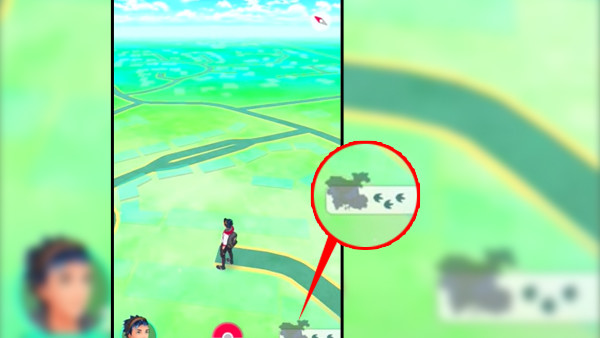
Fire up the app and take a look at the bottom right 'Nearby' menu in the bottom right. Tapping on it brings up a list of monsters with small footprint icons underneath. Whilst these may look to represent availability and popularity, instead they're indicative of distance.
Pokémon GO takes note of where you are when booting it up, and these icons denote 100s of metres; one footprint dictates less than 100 metres, two is 200 and three is 300.
As you're forever travelling further away from your 'starting point', walking in various directions will get you closer to different Pokemon. Furthermore, to nab a specific creature on your Nearby list, tap on it to track them individually and then you can see the footprints decrease in quantity as you zero-in on your prey.
So, either wander around and see what Pokémon show up, or pull up the Nearby list and select a specific creature to track. The 'Nearby' icon will pulsate if you're walking in the correct direction afterwards, and if not, try heading somewhere else and see what else you can come across.
7. Where Can I Catch [Insert Specific Pokémon]?

Sadly you're going to have to rely on a mix of luck and grinding to get childhood favourites like Charizard or Gyrados on your team, as at time of writing, there's no defined place to catch specific creatures.
Instead, Pokémon GO uses Google Maps data to link the game world onto our own, resulting in bodies of water housing their respective Pokémon - the same goes for fields, industrial areas, etc.
You have more chance of finding a Magikarp or Paras next to a river or beach than anywhere else, but that's it for the early-goings. Ranking and levelling up changes the ranks of Pokémon that appear, but that's it as far as 'guaranteeing' a given area will house a specific creature.
6. What Are Gyms & PokéStops?
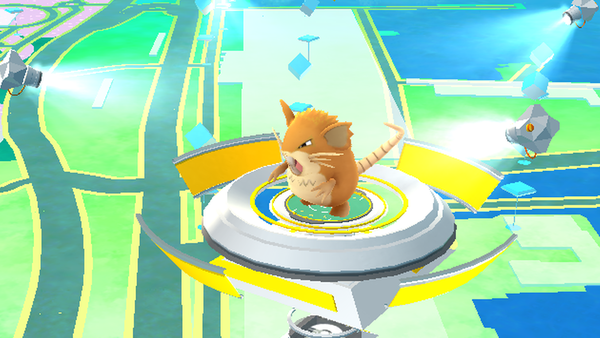
Speaking of gyms, they're one of two main points of interest that pepper the map.
Linked to real-world icons and architecture, gyms are more spaced out that PokéStops, which act as literal 'shops', housing Pokéballs and other items to grab on your travels.
Chances are, booting the game up will result in a handful of PokéStops littering the landscape, and a quick tap will most likely provide a real-world picture, denoting that a landmark, storefront, church etc. is acting as an in-game place to grab your stuff. Simply get within a given radius, tap to enlarge the 'photo disc' of the place itself, and swipe to collect Pokéballs and other items.

As mentioned in the 'Can I Battle My Friends' point, gyms exist as places to deposit your Pokémon for battle against other players. Gyms can be coloured depending on which team has claimed them (you'll choose one of three after hitting level 5), and you can claim them for yourself if you repeatedly battle at the same location over and over.
It's worth noting that as multiple players deposit their creatures, whoever has the strongest combined total of CP (Combat Points) will become that gym's 'Leader', being the final encounter any other players will face. Want to become a Gym Leader? There's your chance.
5. How Do I Train, Evolve & Name My Pokémon?

In short, for the former, you don't. 'Training' in Pokémon GO doesn't necessary require battling, as instead it's predicated more on spending 'Stardust' and 'Candy' to charge up their Combat Power (CP).
Pokémon can fight at the aforementioned gyms, but you'll spend more time walking around the landscape, accruing these items by capturing Pokémon in general. Hop into the Pokémon menu and drop a combination of Stardust and Candy to increase their CP, or if you've enough Candy, you can force an evolution to occur, drastically increasing CP and full health together.
As for naming, look to the tiny pencil icon next to their names in the Pokémon viewer - tap that and call them anything you fancy (yes, anything!).
Bonus tip: Inside the Pokémon screen, pull up a creature and scroll down. Hit 'Transfer' to give the Pokémon to Professor Willow, who'll trade you for Candy relating to the 'family' that Pokémon is part of. This is a handy way of getting rid of your duplicate creatures, so don't forgo capturing what you already have as you walk past - they all come in handy eventually.
4. How Do Eggs Work? Can They Break?

Eggs are unhatched Pokémon, picked up from any number of PokéStops on your travels.
You'll need an Incubator to speed up the process of hatching, but thankfully you have the base model from the start of the game. Hop into your Pokémon team menu and then swipe right into the 'Eggs' category. Tap on any egg and select the incubator - now you have to cover a certain amount of real-world distance to bring them into the world.
On the basic incubator this will be either 2, 5 or 10 kilometres, and don't think you can get around this by hopping in a car and burning around town. The game recognises speed after a certain amount, and if you've triggered an egg to sit in the incubator, speeding up too much will cause it to crack.
3. How Do Coins Work?

Leaping straight into the shop will allow you to purchase all manner of coin bundles for real-world cash, which can then be traded for Pokémon-luring Incense, more Pokéballs and a few other things. They're completely unnecessary, factoring more into players who wish to speed up the experience by buying their way to the top, but are part of the game regardless.
So, you'll mainly get these coins by battling at gyms, although they do deposit from PokéStops too, albeit very rarely. For the gyms, you (or any one of your team) needs to have taken over a gym, to which you can then leave a Pokémon to guard it.
Following this, you'll get 10 coins and 500 Stardust per stationed Pokémon on a daily basis, denoted by the small shield icon in the top-right of the Shop window. This has a 21 hour cooldown, but can be stacked up to 10 times, so place your Pokémon in 10 different gyms and wake each day with a maximum stash of 100 coins and 5000 Stardust.
2. What Do The Rings In Combat Mean?
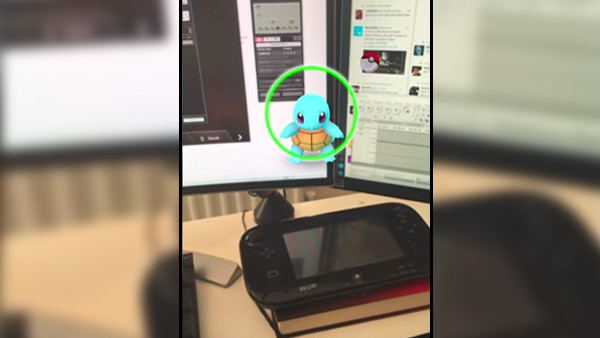
You may have noticed when encountering Pokémon, that they have random rings expanding and contracting around them. Simply hold your finger over a Pokémon to see this.
The smaller the ring, the more chance you have of catching it with one Pokéball, and for the most part, even if the ring is large but still green, you'll nab it in one.
However, as you level up you'll start to see orange and red rings, too. These are far harder Pokémon to catch, and require you to aim far more precisely, essentially to make your Pokéball land in the centre of the ring when it's also at its smallest.
Great or Master Pokéballs can usually get these higher-tier monsters in one hit, but you can eventually wear something like an orange-ringed Pokémon down by repeatedly hitting with standard Pokéballs - just ensure the ring is smallest.
Lastly, look for the 'Berries' item - these can be used to calm orange and red-tier Pokémon. Just head into your bag icon (bottom right) during battle and toss them out, then resume the standard catching procedure.
1. Are There More Features Coming? No One-On-One Battles?

Developers Niantic have been choosing their words carefully across Pokémon GO's development, essentially saying that while they don't intend on adding one-on-one battles any time soon, an interview with The Verge put their focus on expanding what the app can offer as its own experience, stating the 'original 150' roster will see "more [added] over time".
In addition, TechCrunch grilled them as to what features may also make an appearance, to which they noted that trading between players is something they're looking into, but just not to "expect it at launch".
Both ideas are ostensibly luxuries considering the amazing achievement that is turning our actual world into a Pokémon world, so with everything in mind about what Niantic have already done, here's to a healthy future of Pokémon GO.
--
Are there any other burning questions you're wanting answered? Let us know in the comments!