PS4: 9 Crippling Issues That Sony Must Fix In 2016

Microsoft have already won next year if these aren't sorted immediately.

Considering we're past the two year mark on the new consoles and Microsoft have upped their game considerably with the Xbox One, it's about time Sony started making some headway in proving why they deserve such a substantial lead in sales. You need only look to 2016 for a pretty shocking release schedule too, as apart from Horizon: Zero Dawn and Uncharted 4 there's... The Last Guardian and...erm... Final Fantasy VII's remake? Honestly, it's such a bare slate of titles, that when you look to Microsoft's solid rollout of Gears of War 4, Crackdown 3, Quantum Break and Scalebound, really makes you question just where Sony's money is going. Thing is, the PS4 is an objectively fantastic piece of kit - both consoles are in 2015, in all seriousness - but simply because Sony and Microsoft have released machines with such similar specs under the hood, it only makes any issues and/or missing features stand out more than ever.

9. The Lying Loading Bars

The whole 'Play while you install' selling point of both consoles has been a little... undercooked, to say the least. On PS4 it took Sony a good year and a half to actually implement the function they advertised at the reveal event, and on Xbox One, not all the games actually support the function in the first place. Back on the Sony side though, slipping a disc in the drive will always result in a small white loading bar appearing over the game's tile. However, many newer games have started fast-tracking this initial load with a bar that fills up immediately, giving the impression that the game is ready to play - which just isn't the case. Both Call of Duty: Black Ops 3 and Star Wars Battlefront (to name but two) both do the 'quick install' thing and prompt you that they're ready to play, only for you to dive in and realise half the modes are restricted, because the game is still installing. Whether this is on the developer end and they've figured out a way to 'trick' Sony's OS into thinking the game is ready, or the PS4 itself doesn't recognise when certain assets are still being loaded in - the point is that it's always immediately off-putting, booting into a game that's incomplete when start trying to play.

8. The 'Please Free Up Some Space' Installation Glitch
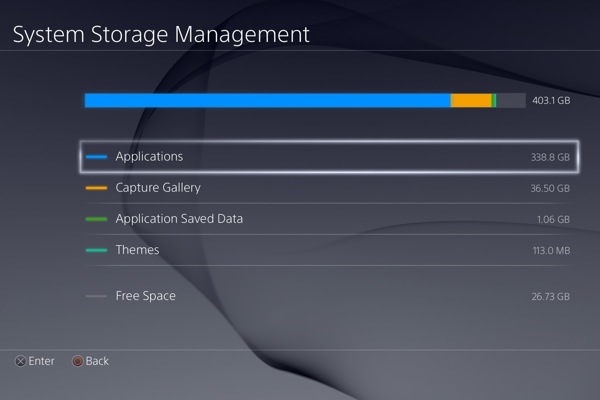
Another strange OS bug comes with the forever-full hard drives everyone has at this point. As a side issue - but still a major one - we really should've got a larger HDD in the box, as 500GB just isn't enough when the average install size of a title is around 40-60GB anyway. Regardless, say you've put a game in and you get the "HDD full, please make some space" message; immediately you'll head over to the System Storage menu and delete a few installed games. However, upon returning to whatever your new title is, the PS4 will again hit you with the "Not enough space" pop-up, because for whatever reason, it's not designed to check the hard drive after that initial insertion of the disc. It means you've got to take the game out and reinsert it (not the hardest task in the world, but you shouldn't have to), to which the PS4 will then check the new space requirements and grant you access. It's a strange setup, that considering the focus on storage management and digital downloads for this generation, is still yet to be addressed.

7. DualShock 4 Battery Life & Analogue Rubber Durability
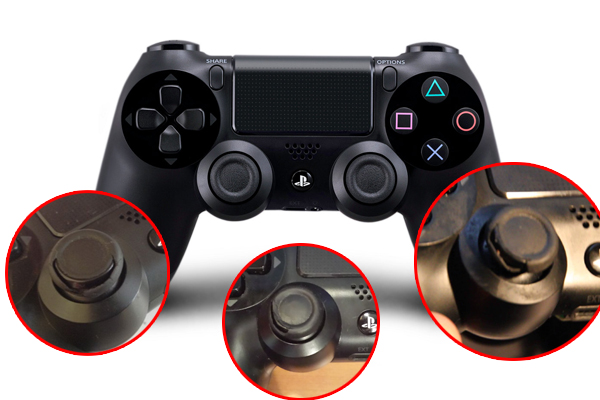
Alright, how many of you out there both A) Have a PS4 from the first few months on sale, and B) Have intact analogue rubber? Exactly. It seems the earliest run of PS4s came with some of the worst rubber coating for the controller's sticks, and although you're better off with a newer model, the DualShock 4's battery life is still terribly short. Personally I've learned to live with the battery by charging it every night, but the controller itself is slowly falling apart regardless. Sony even acknowledged this as a problem in 2014, offering to replace what they say is 'one in ten' controllers, providing your system is under warranty. For the rest of us outside the warranty who've now got smushy, torn covers for our sticks though? We're left to swivel, as unlike the Xbox One's military-grade analogues that look as though they could withstand a firing squad, the PS4's pad is in serious need of an upgrade, both through cosmetics and the battery itself.

6. Trophy Access

You know Sony, we'd care a whole lot more about trophies, if you'd just make them more accessible. The Xbox One has always been ahead of the game in this regard - which makes sense, considering trophies were always a rip-off of the achievements anyway - giving you a trackable list through the Snap menu, which can be pulled up and swapped between at any time during gameplay. It's a great addition, and considering Sony put the time into researching rarity stats for each milestone (so you can get an idea of how skilled you are on a global level) it feels like a major missed opportunity to not surface that stuff in-game, through a simple menu. Right now you've still got to leave your game, jump into the trophy list - which will then take time to 'sync' - peruse what you want to go after, and hop back. Surely it's not too hard to remove the sync waiting time, and also have Trophies be part of the Home menu you access by holding the button in?

5. External Hard Drive Support For Games

Back to the hard drive queries, as there really needs to be a simpler way to upgrade your storage, rather than taking off the faceplate and going through the rigmarole of re-formatting your drive directly. That process is simpler on PS4 than it has been in the past, but for many users they just won't feel comfortable doing any sort of hardware tinkering by themselves. The answer? External hard drives - another thing the Xbox One already has working perfectly. The 500GB limit just isn't enough, an initial figure that both companies put out as a first attempt for a digital generation they wouldn't fully understand until they were in the thick of it. Well, now we all are, and gamers on both consoles are aching for more space. Microsoft are giving it to them - so where's the same treatment from Sony?

4. Free Backwards Compatibility

At time of writing, Sony are working on PS2 emulation for the PS4. However, there's almost no way they're going to offer it in anything close to the 'game n' go' way Microsoft have. Comparatively, the Xbox One lets you play your older 360 games on an emulated console running inside the newer hardware, just by putting the disc in, whereas on the PS4 side, Sony have been very quiet on how their software is actually going to work. PS3 games are available through the PS Now 'Netflix for games' service with some hefty price tags already, and right now the only way you can revisit PS1 and PS2 games is through a PS3 console directly. Basically, Sony are going to continually fall down in this regard, if they don't up their game and simply allow free backwards compatibility. Competition breeds excellence, and what was once thought to be impossible thanks to however the new systems were initially coded, is a major selling point for Sony's biggest rival. People want to honour their old collections, they don't want to buy them all over again. Backwards compatibility should've been free from the start, so here's hoping the PS2 stuff will let you play your titles with no strings attached.

3. Folders & Sorting Options

Despite it featuring on a ton of fan-demands and requests, Sony seem very hesitant to budge from their XMB design for the dashboard. It's definitely a slick enough interface that presents games and apps in a nice horizontally-scrolling display, alongside more integral settings and online options, but ultimately, a big ol' list of everything you've once played just doesn't cut it. We want to be able to sort by something more than just 'Recently Played', as although Sony added in the ability to extend the list to include more tiles, it's a paltry addition to a bunch of options that would actually benefit the games themselves. Let's see optional filters for genres come as standard, alongside custom folders for your favourite games, and in addition, let us opt into a prompt to say it's been a certain amount of time since we last played something, remind us of a recent download that's not been played, or a trophy we were close to unlocking. In a climate of vastly reduced prices and digital downloads making impulse buys more frequent than ever, it's quite easy to grab a whole host of games and file them away in your mind as something you'll get to eventually - so why not remind us through the dash?

2. Custom Wallpapers

Alright, last thing the Xbox One does that the PS4 doesn't: Custom wallpapers. Both consoles used to be tied on this stuff until Microsoft's latest update undid the shackles and let you throw on whatever you like behind the menus, and it's an ethos Sony should hold true to. The PS3 and 360 both allowed custom wallpapers in the last generation, and it's blatantly obvious that the only reason they was removed was to force you into buying the various 'Themes' that are on the PS Store. Custom wallpapers shouldn't be a massive deal, but that's precisely what makes them stick out more than ever.

1. Make The Touchpad Do Something

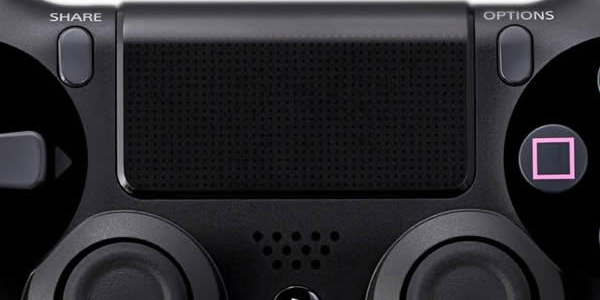
Okay, the lightbar on top of the pad is a lost cause, we knew that from day one, and although Sony have given us the option to lower the brightness, I wouldn't be surprised if future versions of the controller simply cover it over in full. Next to that though, is the touchpad - a potentially slick little addition that so far, has been reconciled to a stand-in for 'Select' and 'Start' buttons by developers, simply making you push either side of it to replicate the DualShocks of old. Metal Gear Solid V and The Witcher 3 played a little bit more with this, assigning functions to holding the button down or swiping to bring about specific menus, and it's a notion that should be all over the dashboard in full. If Sony revamped the XMB to have greater touchpad integration, you could swipe in all four directions to access universal commands for trophies, the PS Store, settings and friends lists, for example - or draw a semi-circle to close any background apps, bring up an app-swapping menu, etc. There are all sorts of applications for this part of the pad, so let's see it put to far better use than it is right now.

In this post: 
PS4
 
Posted On: 
Gaming Editor
Gaming Editor

WhatCulture's Head of Gaming.