10 Reasons You're A Fool Not To Game On PC

PS who and Xbox what?

It's a long time since PCs were unsightly beige boxes that sat dejectedly in dark studies or basements; lost amidst piles of paperwork, old books and moulding coffee mugs. But for some reason, the average console gamer still perceives them that way. Whenever a debate about the merits of PC and console gaming, we always hear uneducated statements like 'it's hard to hook gamepads up to a PC' or 'you can't play PC games on a big TV'. But thanks to the efforts of companies like Microsoft and Valve, the PC is forcing its way into the space previously reserved exclusively for games consoles. In addition, the rise of streaming devices for the PC has opened up a world of possibilities for PC gamers, combating the myth that consoles offer a more comfortable or accessible gaming experience. You no longer need to download dodgy programs to get a gamepad working on your PC, or cram four rigs into one room to play with your mates. The PC can do anything a console do and better, and the world needs to know! So suspend your skepticism, o' naive console gamers, and behold how a PC can have all the perks of a games console, but with more power, more choice, and a hell of a lot more modding.


10. YOU Decide Which Controller To Use
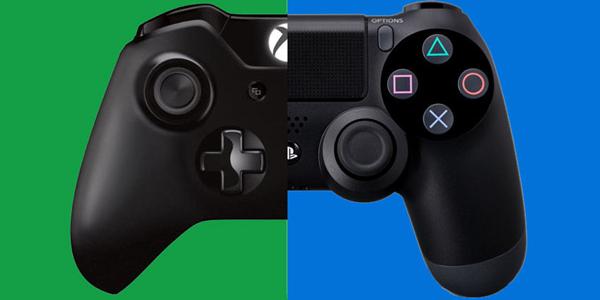
One of the most common - and indeed naive - allegations against the PC is that it's difficult to set up with a gamepad. We're not in the 90s any more, people! Console gamepads are easy to hook up to your PC, and best of all, you have a choice of which one you want to use. To hook an Xbox One controller up to your PC, you simply need to plug it in using a micro-USB cable and download the drivers. If you're on Windows 10, then the drivers are already installed. If you're on Windows 8.1 or earlier, then you can download the drivers from the official Xbox support page. Connecting a DualShock 4 is a little bit harder, but not rocket science. Sony didn't quite come good on its promise that the PS4 controller would work with Windows out of the box, and the best way to hook it up is to trick it into thinking you're using an Xbox 360 gamepad. To do this: Download and install the latest version of InputMapper Plug your DualShock 4 into your PC using a micro-USB cable Open InputMapper, and it should recognise the controller immediately. You'll need to open InputMapper each time you want to use a PS4 controller to play a game. Yet another alternative is to try out a Steam Controller, which will be released in November. It works natively with Windows, and alongside an analog stick and buttons it features dual trackpads, which are designed to offer keyboard-and-mouse-style precision that other gamepads have always failed to emulate.

9. Your PC Is Just As Easy To Hook Up To A TV
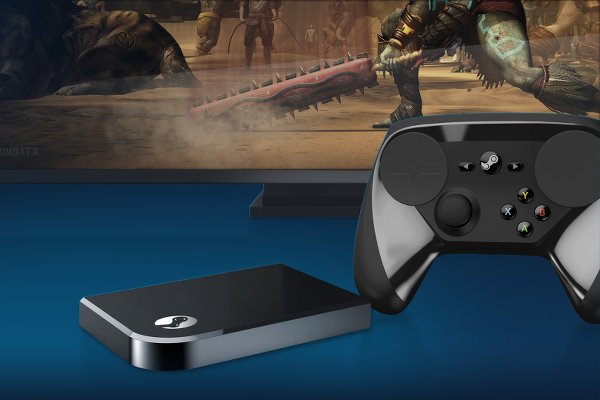
Today's TVs and computer monitors are virtually indistinguishable from each other. They both offer 1080p-plus resolutions, widescreen displays and HDMI ports. This means that your PC can easily be plugged into your TV using an HDMI cable to beam your PC to your living room TV in all its HD glory. Gone are the days of PCs being restricted to puny monitors while consoles hog all the screen real estate of your living room TV. But if your PC is in a completely different part of the house, you should try out one of the many streaming options now available to gamers. Built into Steam is a feature called 'in-home streaming', which lets you stream games from your main rig to other computers in the house. While you can't use this to directly beam Steam to your TV, you can plug a laptop into your TV, then stream your gaming through that. Alternatively, you can try out Steam's upcoming Steam Link device, which will cost just $49/£33, and is designed with the sole purpose of streaming your PC gaming to your TV. Intriguingly, Valve boss Gabe Newell said that the Steam Link technology may eventually make it into TVs, so you'll one day be able to stream your PC gaming to your TV without having to buy any extras.

8. Steam's Big Picture Mode Is The Best Dashboard
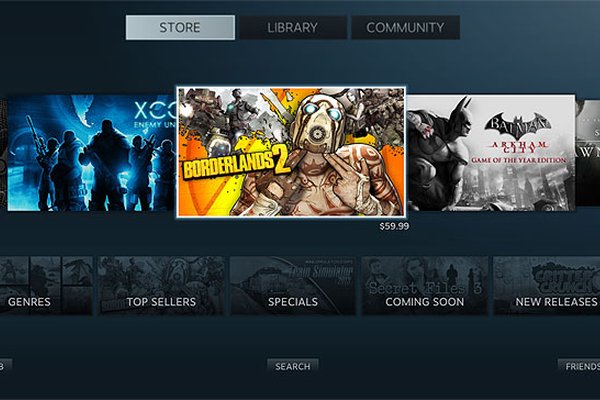
So you've hooked your PC up to your big TV, and are now kicking back with the gamepad you installed on it. One of the joys attributed exclusively to consoles is that you don't have to move from the couch to access your games library; everything can be done using the PS4 or Xbox One interface, which is designed to be navigated with a gamepad. But your PC can offer exactly the same experience! If you're playing games on Steam (which in 99% of cases you will be), then you can use the underrated Big Picture Mode - a console-like interface that you can control using only your gamepad. You can do everything in Big Picture Mode that you could do in the standard Steam interface, such as navigate your games library, chat with friends, and buy things in the Steam Store (which, it should be mentioned, offers a bigger collection than both the PlayStation Store and Xbox Marketplace). To go into Big Picture Mode, simply open Steam, then click 'Big Picture' at the top right corner of the interface. Lay out several hours worth of gaming snacks in a semi-circle in front of the couch, then game the next several hours of your life away.

7. Mods Aren't As Scary As They Used To Be

To the casual gamer, mods might still be seen as these weird, mysterious entities that should be left to the geekiest of PC gamers, lest they screw up your computer forever. Mods are quite simply modifications created by tech-savvy gamers that add new elements to games, or tweak existing ones. Certain games, like Skyrim, have particularly thriving modding communities, multiplying the amount of content in the game and extending its shelf-life by years. Thanks to Steam Workshop, mods are no longer as scary to install as they once were. If you want to check out available mods for a game you own on Steam, just go to the Workshop section for that game, and see what crazy concoctions (Randy-Savage-Saurus for Skyrim, anyone?) people have come up with. Most mods here can be installed from within Steam directly, and can then be accessed and tested out from the options screen of the game. So if you're toying with the idea of PC gaming but are a little apprehensive about whether you'll get to join in on the mod mayhem that it offers, fear not, because the whole scene is very much open to everyone these days.

6. Add Split-Screen To Tons Of Games

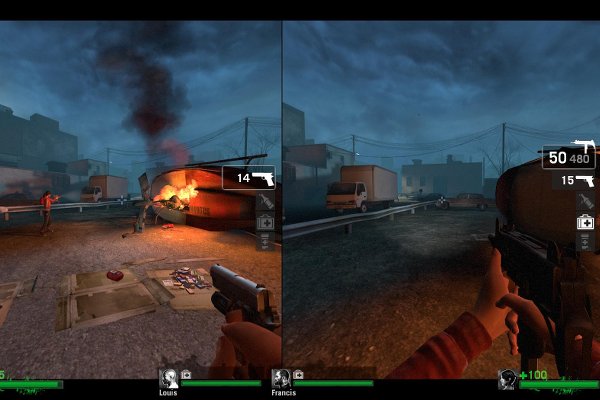
One of the more legitimate criticisms console gamers can make of the PC is that it's not as open to split-screen gaming, with many popular games - such as Diablo III, Left 4 Dead 2 and the Borderlands series - featuring split-screen modes on consoles but not on PC. This can be traced back to the perception of the PC as a platform for lone, hardcore gamers. Given mainstream gaming's steady, sad march away from split-screen modes altogether, we're not likely to see the number of split-screen games launching for the PC increase any time soon. However, the PC gaming community is a resourceful one, and there are plenty of mods that add local multiplayer modes to some of the most popular games out there. You can, for example, unlock split-screen mode for Left 4 Dead 2 and Borderlands 2. If the console version of the PC game you own has split-screen mode, then there's a good chance you can find a mod that adds it for your PC. On top of that, there are some great mods which add online multiplayer to games that never featured it before; the chaotic Just Cause 2: Multiplayer Mod is a fantastic case in point.

5. The PC Has The Biggest, Cheapest Games Library

It's incredible how few console owners are aware of the all-conquering PC gaming platform that is Steam. Steam completely changed the PC gaming scene when it was released in 2007, encouraging indie development and providing a hub from which you can access your games library, store, friends lists, and more. Steam's catalog currently features over 5,600 games, and this number is growing exponentially. What's more, the fact that the entire PC platform - in contrast Xbox One and PS4 - isn't vertically owned by a single company means there are plenty of other sites where you can buy games at competitive prices. This means that a PC game that you can also get for consoles is likely to be half the price of the console version just a few months after launch. Also, the idea of 'backwards compatibility' is a non-issue for the PC gamer, as the vast majority of PC games ever created continue to be playable on newer machines.

4. Older PC Games Are Playable, Cherished And Updated
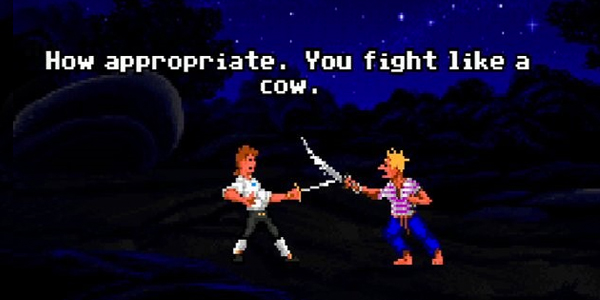
Backwards compatibility has been a huge point of contention for console owners in both this generation and the last. Sony and Microsoft effectively encouraged gamers to abandon their beloved games from generations gone by, and this caused a fightback that is only now being addressed. Sony is doing this with PlayStation Now, which lets players stream older games to their PS4, but streaming games is still nowhere near as effective as playing them directly through a cable, and the service forces you to re-buy games you may already own. Microsoft deserves more credit here, by adding genuine backwards compatibility for Xbox 360 games to the Xbox One. But all this still pales in comparison to the treatment older PC games get. Beloved games from 15+ years ago are updated by fans long after developers stop supporting them. Backwards compatibility is a non-issue thanks to compatibility modes in Windows and DOS emulators. And once you buy a game on Steam or another digital retailer, it's yours forever to play on your PC, no matter how much your PC evolves over the years. All your games - no matter how old - deserve a home. Your PC, and its dedicated community of moddy, techy gamers can see to that. Shame on the consoles for abandoning their elderly, really.

3. You Can Play ALL Your Retro Games Perfectly

The PC manages to trump current-gen consoles thanks to its ability to easily emulate any console of the pre-PS3/Xbox 360 era. Who needs backwards compatibility on consoles when you can play just about any older game from any console on your PC? Console emulators use PC software to mimic the hardware used in games consoles. Emulators of more recent consoles can be quite demanding on PC resources, because you're getting a program to do the same job as a whole machine. So make sure your rig is up to the task. Notwithstanding, emulators give you access to all the games from generations gone by, which you can download as ROM files from various websites. Combine your emulators with gamepads and a TV connection, and you're looking at a whole world of gaming nostalgia. Here are some of the best emulators for older consoles: GameCube - Dolphin PlayStation 2 - PCSX2 PlayStation - ePSXe N64 - Project64 SNES - ZSNES Dreamcast - NullDC Note that downloading a ROM (a file that contains all the data from a video-game cartridge or disk) is illegal unless you own an original copy of the game.

2. Your PC Can Turn Into An All-In-One Emulation Station
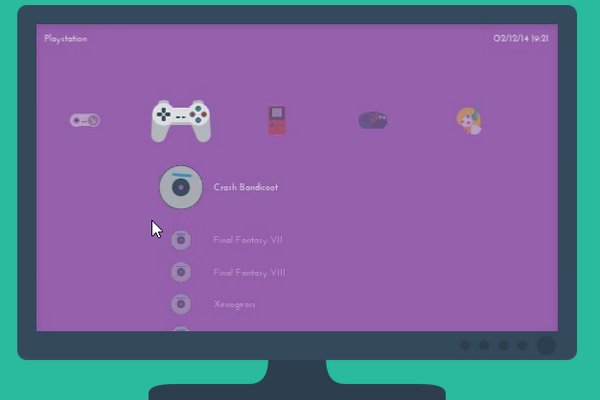
Flicking between all your old-school emulators can be a messy business; messy meaning you might have to get up off the couch and use your keyboard and mouse to navigate to a different emulator when you're finished with one. Console gaming is an inherently ass-in-seat pastime, so it shouldn't demand any physical effort from you other than in your fingers and wrists (that's why the Wii will never count as a real console). To help you stay lazy, you should check out Lakka for all your pre-Dreamcast gaming needs. It's a custom Linux distribution that you can run off a USB stick, and which displays all your emulators in one slick interface. It can be controlled with a gamepad too, so minimal exertion is required.

1. They're Just So Damn POWERFUL

Saving the simplest point for last, it's still worth reiterating that the power of even an average PC completely eclipses that of the Xbox One and PS4. Plenty of people have built PCs rivalling the power of current-gen consoles for only around $400/£250. Spend a little a bit more, and you enter the rarefied realm of gaming that only the PC gamer understands. 1440p resolutions are the order of the day even in mid-range rigs (yes, console gamers, you can game at resolutions over 1080p), and if you're playing at frame-rates lower that 60fps (most consoles games are capped at 30fps) then you're probably already thinking about what you can do to get them back up again. Of course, it's worth noting that many top games tend to be optimised towards consoles, meaning that their performance relative to the hardware is sometimes worse on the PC. This has been particularly noticeable in this console generation, in which console-centric optimisation has forced PC hardware to up its game even further to maintain its vast superiority in performance. But PC graphics card big shots AMD and nVidia have raised their games in response, offering new generations of GPUs that compensate for the optimisation deficit. The upcoming DirectX 12 for Windows 10 should also ensure that the PC maintains its historical position as the ultimate platform to experience a game in its full glory. Have you seen the alluring light of the PC? What's holding you back? Let us know in the comments where your gaming allegiances lie!

In this post: 
Steam
 
Posted On: 
Contributor
Contributor

Gamer, Researcher of strange things. I'm a writer-editor hybrid whose writings on video games, technology and movies can be found across the internet. I've even ventured into the realm of current affairs on occasion but, unable to face reality, have retreated into expatiating on things on screens instead.