Hands On - Planet Coaster: Console Edition
Frontier's seminal Park Sim is heading to consoles this Holiday!
I am a huge fan of Frontier Developments’ Planet Coaster. I have sunk 500 hours into the original PC release, and last year, Frontier announced their seminal Park Sim was coming to Consoles. After huge success with Jurassic World Evolution releasing on PC and Consoles back in 2018, the market for a full-fledged park simulation video game on PlayStation and Xbox was open. Come late 2019, Frontier announced Planet Coaster: Console Edition, an almost direct port of the original PC game to PS4, Xbox One, PS5, and Xbox Series X/S.
I have had the absolute pleasure to play about 90 minutes of Planet Coaster: Console Edition (or PlanCo: CE as I'll refer to it from here), and as someone who adores the PC release, I was excited to see how seamlessly the experience of building your very own Theme Park transitioned from a mouse and keyboard to a controller. Here are my thoughts.
Click Next to begin!
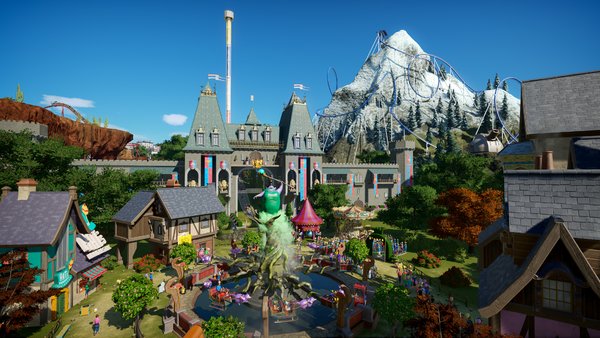
Make no mistake, this is no watered-down Park Sim on a console. Jurassic World Evolution was a fantastic place for budding players to get to grips with the genre, as it was rather simple, but PlanCo: CE is the real deal. Whilst pre-made Blueprints for Coasters and Scenery are pushed to the forefront, the ability to create an attraction entirely piece-by-piece is just as feasible as it is in the PC version. One huge flaw of the PC version of PlanCo is the lack of tutorial, and while the paid barrier for entry is pretty low when Steam puts a sale on, new players can feel out of their depth.
Taking a leaf out of Planet Zoo's book, PlanCo: CE features a thorough, fully voice-acted tutorial level, which not only gives new players a taste of how the game works, from building attractions to managing finances, but also gives you all the info you need on how to actually use the controls. I played the tutorial in its entirety (which is about an hour long), and even if you are already a PlanCo veteran, it really helped to give you a head start in getting your head in the game. The spoken dialogue, delivered by new characters in the PlanCo universe, is straight-forward, informative, and also rather funny. Hearing a park manager bash heads with the financial director, all while a park enthusiast 'scoots' in to help you place food and drink stalls makes for a brilliantly engaging time. I just hope the PC release is updated to get this tutorial level, and even controller support too! Jurassic World Evolution had controller support on PC, why not PlanCo too?
[Cont.]

Speaking of controllers, Frontier managed to nail their use as an input in Jurassic World: Evolution, and though it is a much more complex title, PlanCo: CE's controls are equally as intuitive and easy to learn, yet still gives you an incredible amount of control over your building. From bins and benches to scenery pieces, grid-based buildings and roller coasters, the whole process feels almost effortless. It's a little fiddly to use when you first lay your hands on it (it's a Park Sim after all, this isn't a huge surprise), but everything makes sense. It's incredible how what appears to be an incredibly complex toolbar is actually completely traversable with only one or two button presses.
A crosshair is used for pointing, similar to what was used in Jurassic World Evolution, and it connects your hands to the park as precisely as a mouse would. The use of a radial menu for quick switching between main tools makes for much easier control over what you're doing, whether it's smoothing out a section of track, or switching off angle snapping while building paths. Moving around in a 3D space whilst fiddling with 2D menus might seem like a chore, but the left thumbstick and d-pad are used for these things specifically respectively. While you turn a section of track with the thumbstick, and bank it by holding X (or square) and a trigger button, you can switch off track supports by simply using the d-pad and the A button. It sounds complex when you write it out, but it's incredibly intuitive, and actually rather simple when you get into the swing of it.
[Cont.]

If you're like me and you spend 30 hours building one attraction, PlanCo: CE still has you covered. All of the grid-based scenery items are present, and even the 'advanced move' tool is available, if you wish to be obsessively precise with your building habits - I know I am. After completing the tutorial level, I jumped straight into the Sandbox mode to give building a custom coaster a try, and much to be expected after the first hour of play, building a representation of a B&M Dive Coaster was an utter breeze.
Using the thumbsticks and triggers to turn and bank track, while using the shoulder buttons and the d-pad to navigate through the side menu to change the track type and add pre-fabricated elements (such as loops) felt entirely natural. In fact, it felt like I built that coaster quicker with a controller than how I usually would with a keyboard and mouse! All of your post-build customisation options are present, such as control over block sections, colour schemes, and naming your coasters! Building a station platform on the grid system is more finicky with a controller, but it's still entirely doable.

My time with Planet Coaster: Console Edition has managed to exceed my already high expectations. As someone who wasn't sure about how well a complex title like this would translate to controller input would go, I am very pleasantly surprised. To those who have been clamouring for this title to release on consoles for nearly four years now, you're in luck. This is the full Planet Coaster experience, and then some. Kicking back and building an incredible theme park from the comfort of your sofa is something to really get excited for come this holiday season.
Thank you so much to Frontier for the early hands-on opportunity for Planet Coaster: Console Edition
Planet Coaster: Console Edition is available for pre-order here.