Planet Coaster: Console Edition Review - 6 Ups & 2 Downs
Theme Park nerds rejoice, Planet Coaster has arrived on consoles!

Back in 2016, the Park Sim genre of video games made a comeback. It had been twelve years since the iconic RollerCoaster Tycoon 3 , and the franchise had been run into the ground by Atari ever since. The developers of RCT3, Frontier Developments, crafted the spiritual successor to the threequel, Planet Coaster, and was met with rave reviews. Atari followed up with RollerCoaster Tycoon World, which was nothing but a laughing stock - and that's putting it nicely.
Four years later, Planet Coaster has continued to be a much loved park sim, with its own sister title Planet Zoo releasing late last year. Come 2020, the means of creating your very own theme park has made its way to PS4, PS5, Xbox One, and Xbox Series X/S via Planet Coaster: Console Edition, a marvellous port of the original PC title, ready and waiting to be tackled with a controller. It must have been no easy feat to translate such a complex PC title to console, but Frontier have struck gold with the Planet franchise once again.
With 500+ hours in the original PC release of Planet Coaster, who better than to put their muscle memory to the test with a whole new Planet Coaster experience? Please keep arms and legs inside the car at all times, and hold on tight. This is one smooth ride.
Reviewed on PS4.
Ups
6 - The Controls Are Excellent

Transitioning between around 100 individual keys to something with only a handful of buttons at its disposal was no easy feat. However, Frontier have done what many might see as impossible: have every ounce of control available in the original Planet Coaster easily accessible with a controller. The button mappings to navigate menus, build roller coasters, and move around in 3D space (sometimes all at the same time) is nothing short of sublime.
As much as they are a little finicky to get your head around and master, once you’ve got the basics under control (definitely play the tutorial level - that I’ll get to), you’ll be breezing about your park, building attractions and placing flamboyant toilet buildings like a pro. It obvious the development team took a leaf from Jurassic World Evolution’s book, which is only a good thing, as kicking back and building a park from your sofa is as precise as you’d probably have hoped.
5 - The Tutorial Is A Fantastic Inclusion

A glaring flaw of the original PC release was the lack of tutorial. This wasn’t a title those versed in RollerCoaster Tycoon 3 would instantly understand. It was a much more modern, much more complex title, with a subsequently more drastic learning curve. All you had in terms of a ‘tutorial’ was diving straight into the Career mode, which didn’t tell you all that much. Planet Coaster: Console Edition remedies this with a fantastic tutorial level, reminiscent of the tutorial included in the PC release of Planet Zoo last year.
If you’re going into PlanCo: CE blind, this is a truly excellent place to begin your theme park journey. The tutorial gives you a great grounding into the mechanics of the game, and is incredibly entertaining since it’s been fully voiced: featuring your guide, Oswald B. Thompson, a stingy executive focused entirely on revenue, a sheepish park technician, and a bubbly park enthusiast (definitely a nod to us coaster nerds playing the game). You’re led through all the basics, including uploading items to the Frontier workshop, then you’re free to traverse the title’s Career, Challenge, and Sandbox modes with your fresh know-how in tow! The tutorial is completely optional, but as someone who already knows this game back to front, I highly recommend playing it through not only to learn new controls (if you’re coming across from the PC version), but also because it’s hilarious to see the characters banter each other off!
4 - A Title With Infinite Possibility And Accessibility

As with a park simulation title, your imagination is truly the limit. Planet Coaster offers the ability to create whatever you want, moreso than any park sim that has come before it. Console Edition is no different, as you have full access to the entire base game’s repertoire of scenery, from the generic ‘Planet Coaster’ theme, to Pirate, Fairytale, Sci-Fi, and Western. Blueprints for scenery groups and buildings have been pushed to the forefront of the UI, as creating something with individual scenery/building pieces is much more complex - that I’ll get to later.
The title offers hundreds of pre-build scenery items, shops, and coasters to choose from, all with ranging themes and sizes. There are even more pre-built items available on the Frontier Workshop (a parallel of the Steam Workshop for use on console), which will continue to grow as more players upload to it. If you search for ‘Antiquity’ on the Frontier Workshop, you should find a Barghest coaster built by me, which you can put in your park! If don’t have an eye for creating delightful buildings piece by piece, you’re not going to be left in the dark, as both the game itself and the community have got you covered.
3 - Coaster Building Is A Breeze
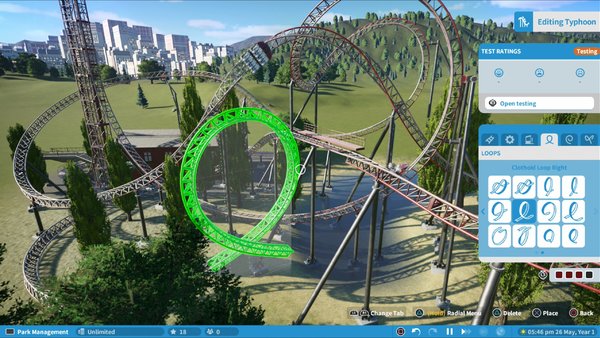
Speaking of building things by hand, one of the main attractions of Planet Coaster (pun intended), is the ability to build your own roller coasters. Unlike previous park sim titles, you have much more flexibility in building your coasters, which does make things more complicated. However, building a coaster with a controller proves to be an intuitive and enjoyable experience.
Using the thumbsticks and d-pad in parallel to move the track and cycle through the building menus respectively makes for an natural (albeit fiddly at first) process. You still have all the customizability present from the PC version, such as adding catwalks and smoothing various elements of the tracks, all of which seems so much simpler when using thumbsticks over clicking and dragging with a mouse. You wouldn’t be wrong for assuming some loss in precision when moving over to a controller, and while the camera control during construction could do with a bit of work, it’s definitely a precise enough input for a solid building experience.
2 - It's A Smooth Experience
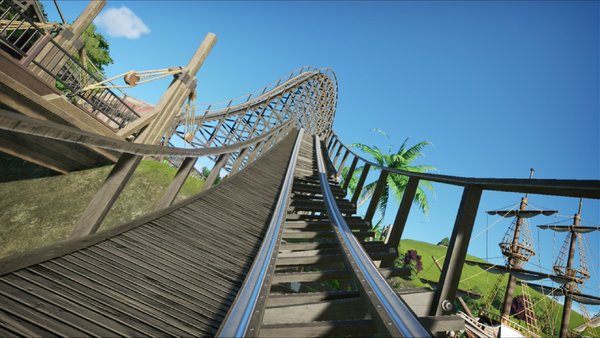
Accommodating an entire theme park along with thousands of individually thinking guests on a single system is no easy task. It’s a feat achieved by previous titles in the genre, but none of them look as good as Planet Coaster: Console Edition. With that in mind, even a high-end PC can struggle with a fully detailed, fully populated park up against it, and the idea of it running on what would be usually lower-end hardware in comparison made for mild concern.
However, Planet Coaster: Console Edition runs incredibly smoothly on PS4 and Xbox One (and will most likely run smoother for longer on the PlayStation 5 and Xbox Series X/S). The game will even warn you when your console is starting to struggle, as the ‘Oswald-Eugene Counter’ will show up, giving you a rating out of 100 of just how strenuous your park is on the system. No consoles will be catching fire or dropping mad frames if you’re paying attention! Hitting 60fps on a park sim as complex as this is a huge achievement for Frontier, and it goes to show just how capable the Cobra engine is.
1 - This Is Planet Coaster
This is no half-baked console port. Frontier have done everything in their power to create a version of Planet Coaster on console faithful to the original. As much as things have been remixed slightly in terms of the UI, and the aforementioned blueprints have been pushed to the forefront, this is still the Planet Coaster many players have loved over the last four years - just on a new platform.
Everything you can do on the original PC version you can do here (apart from custom scenery - unless the Thememakers Toolkit somehow makes it onto console). Since it is so similar, the DLC packs we’ve had on PC could potentially come to the console version in the future since all the functionality is there. The Studios pack is a must-purchase, trust me.
If you’ve been clamouring for a console release of this game since 2016, you’re in luck, as you’re getting the full experience from start to finish. Planet Coaster: Console Edition is an absolute marvel, and the park gates are open for a whole new audience to come and enjoy its exhilarating park sim experience!
Downs
2 - Detailed Building With A Controller Is A Chore
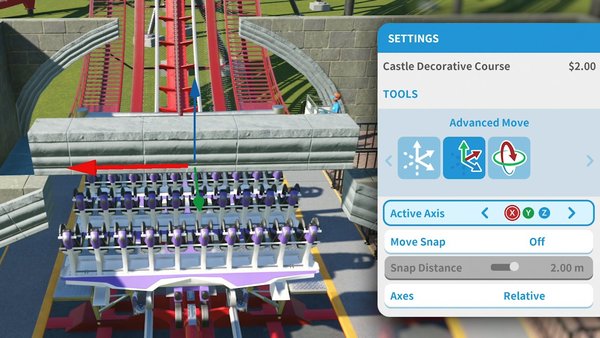
Piece-by-piece building is more than feasible on Planet Coaster: Console Edition, but as said, it’s been relegated to standing behind the blueprints system. Once you’ve found your way through to the individual scenery pieces via the ‘Create’ tab, you can set to work on building your own- anything piece by piece.
With a controller however, this is incredibly finicky. Moving pieces around on a grid can be a chore. Whilst the advanced move functionality is a great inclusion (I am genuinely surprised this level of control ended up in the console version), it definitely has a tougher control scheme to get used to. It’s not at all impossible, but it’s the one aspect of this title that has struggled to translate over to a controller.
You could always plug in a keyboard and mouse. But that opens up yet another problem.
1 - Mouse & Keyboard Controls Are Sluggish
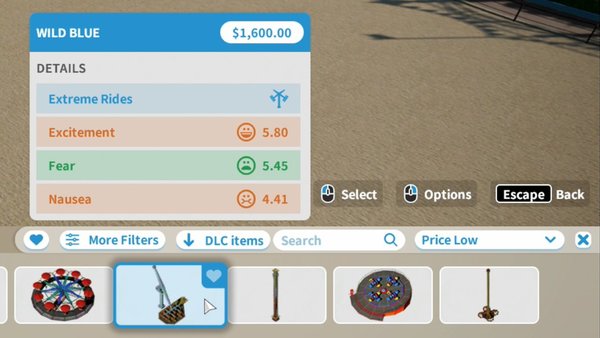
Planet Coaster: Console Edition including mouse and keyboard support is a stroke of genius. If a controller doesn’t cut it for you, plug in some peripherals and you’re off. There’s no need to fiddle with settings either, your PlayStation or Xbox should just recognise them as input devices (I would recommend using wired peripherals - my PS4 thought a wireless mouse was a keyboard), and the game will automatically switch your UI prompts to show keyboard and mouse - and even use the same cursor as the PC version!
However, whether this is on the PS4 side (not sure about Xbox specifically) or the game’s side, there are clear latency issues with these inputs, especially the mouse. While it’s not an outright unusable input method, it’s not as crisp as it is on PC. While I shouldn’t be surprised it wasn’t a 1:1 experience (these are consoles after all, not natively designed for these inputs), it was a shame for there to be such blatant latency issues. This could be something fixed in a patch if it’s software side, or it’s merely something to get used to over time if it’s a console limitation.