Nintendo Switch: 9 Hidden Console Features You Didn't Know About
It's Nintendo, of course there are a ton of secrets.
Now we've had the opportunity to live with the Switch for a few years, experiencing how it factors into everyday life, chances are you've formed quite the genuine bond with Nintendo's little handheld/home console hybrid.
It's a weird way to think of a game system, as the faux-monolithic form factors of both the PS4 and Xbox One have conditioned us to think of consoles as subtle additions to the living room, blending in next to set-top boxes and blu-ray players. Yet, "To hell with that!" screamed Nintendo, as the completely unique-feeling Switch entered our lives, its sales skyrocketing to almost Wii-toppling numbers as almost a quarter-million units continue to be shifted each month in America alone.
Indeed, Breath of the Wild was just the tip of the iceberg when it came to awesome games fleshing out the console's library, yet Zelda's mentality of exploration first, word-of-mouth second has extended to the system itself. The Switch may be relatively unassuming, but beneath that streamlined approach are a number of key console features Nintendo themselves have seldom spoke of.
9. Pair A Joy-Con With Your Phone
For years we've been able to pair the likes of DualShock 4s or Xbox One pads to mobile phones, thanks to their Bluetooth capability, but say you're going on holiday or would otherwise like to take a controller with you, both options are far too big.
Check out the above video for a breakdown of how to connect in real time, but sufficed to say it's extremely easy. Just ensure your Joy-Con (left or right) is searching for connections (prod the tiny black 'dot' button on the side), hop into your phone's Bluetooth settings and you'll see it ready to be paired.
Tap to connect, and you're away.
Thankfully, many of the biggest mobile games and ports support controller functionality: GTA III and Vice City for example, Minecraft: Pocket Edition, Soul Calibur, Sonic the Hedgehog - basically, this makes the idea of playing on a phone something you might actually take seriously.
Note: Thanks to this Bluetooth-contingent setup, you can also pair the Joy-Cons to a Mac or Windows PC, but not an iPhone (Apple get very close-minded when it comes to their phone's functionality). Connect both pads, and you've got a much more cost-effective way to play that Steam library of multiplayer games.
8. Check Facebook With The Hidden Internet Browser
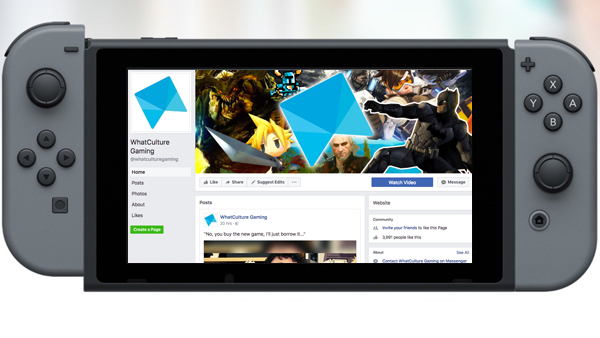
This one's a bit strange, as although the Switch doesn't actually give you the option to browse the web, it still has a built-in web browser.
I know, it's just Nintendo being Nintendo. Bear with me.
For the most part, said browser is necessary for the system to connect to a variety of services and/or platforms, both released and upcoming. Like Facebook, for example.
So, if you head into your User Settings and then 'Posting to Social Media' and hit 'Link', the Switch will open its browser window and take you to Facebook's login URL. However, inside this window you can navigate to your main feed, post statuses, check notifications and even watch videos, as the Switch supports many types of playback.
Note that you can't navigate away from Facebook, but hopefully this means a full internet browser is coming.
7. Attach A USB Keyboard
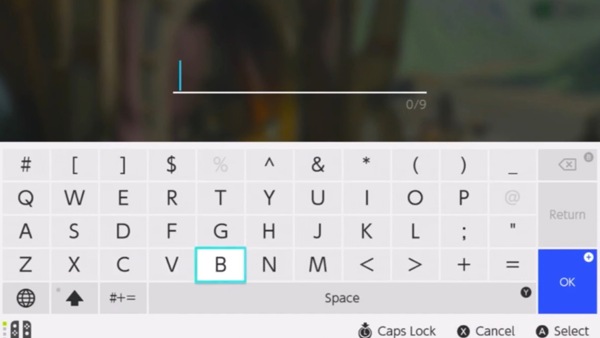
Sick of typing out sentences for your pictures or when making memes? Just attach a USB keyboard.
Thankfully, it's a supremely simple setup, and the Switch appears to support the vast majority of models under the sun; from the $5 bargain bins to luxurious, million-button behemoths.
Once you've got your keyboard plugged in, you might need to hop into the Album, go to Add Text and prod the 'globe icon' (seen in the bottom left above) to ensure everything is connected, but it should be as simple as typing and seeing the letters appear where they should.
Note: Somewhat obviously, this only works when the system is docked, as the necessary USB ports are on the Dock itself.
6. Make Your TV Turn On When It Boots Up
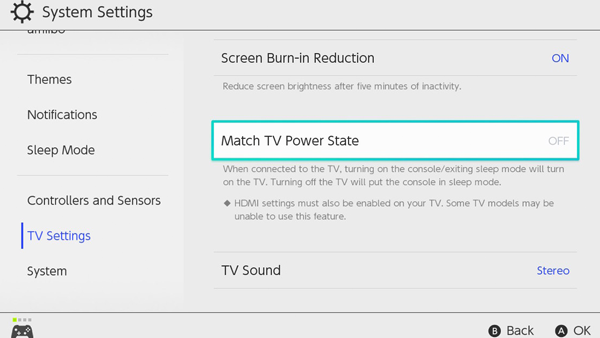
In the grand scheme of eliminating any unnecessary button presses from all technological interactions, the Switch can take control of your TV. This means when you boot it up, say everything is turned off, your Switch turns your TV on and changes the input to the right channel, too.
Pretty cool.
Whilst many consumers have complained this feature kicks them off other inputs mid-program, the on-by-default option to 'Match TV Power State' can be monitored from within the System Settings.
Keeping it on will actually power your Switch back down if you turn the TV off first, too.
The vast majority of modern TVs support this 'handshaking' between system and TV, but don't be too disappointed if your favourite purchases can't be friends.
Move over PS4 and Xbox One, the Switch controls the living room.
5. See How Long You've Been Playing A Game
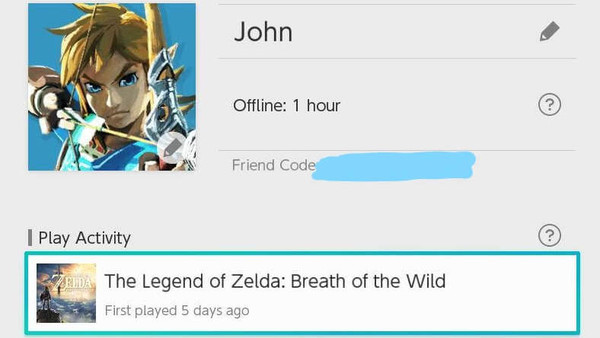
This one's a little weird, as although many consoles tell you - down to the second - precisely how long you've logged on a given game, the Switch has an activity log that gets filled up over time.
Firstly, you find it by clicking on your User icon in the top left, but you'll not see any games listed until 10 days after first playing. Why? Because Nintendo, but once that time has passed, you'll start to see your collection broken down, complete with for how long.
And yet, even then, the Switch doesn't give you specifics. It'll pop up and say "More than 80 hours", "Less than a day", "A few minutes", sometimes updating to a specific hourly figure and other times leaving the details for you to assume.
It's... well it's more Nintendo than Mario sliding down a flagpole whilst singing the Zelda theme, but it's better than nothing.
4. Turn The Joy-Cons Into Wiimotes
Unique to World of Goo as an implementation, but the Switch Joy-Cons actually continue the functionality of the original Wiimotes i.e. they can be pointed at the screen and used to track a cursor in real time.
It may seem like a minor feature, but this proves Nintendo have subtly cracked how to enable the functionality without a sensor bar atop your TV - a notable step forward from the Wii and Wii U. And yet, they've barely advertised it!
World of Goo uses the control method to build its many in-game structures - and will set up the Joy-Con when you boot up the game - but this could pave the way for backwards compatibility, letting developers know the Switch can easily handle games aimed at Wiimote-waggling older demographic.
3. How To Perform A Full Reboot

Bugs, crashes and crippling glitches are going to happen to the best of us, it's knowing how to get your console working again that prevents any mass freakouts.
To that end, if your Switch becomes unresponsive for any meaningful length of time, hold the power button on top of the screen for 12 seconds. This will force the OS to do a full reboot.
Once the console is off, give it a few seconds for any overheat/fan issues to calm, and hit power again to return to the dashboard. This has solved the majority of software-influenced issues, though if the worst happens and your data appears lost, know there is a Recovery Mode to fall back on.
2. Switch Regions To Change Game Artwork
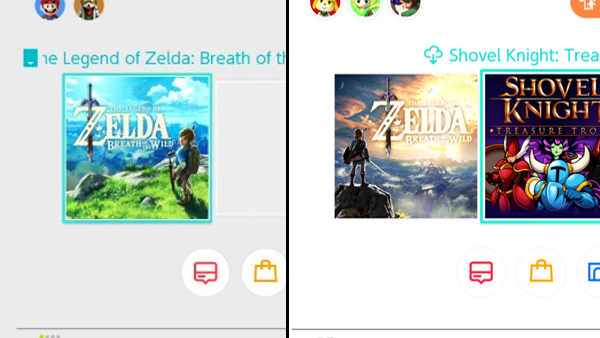
A tiny thing here, but did you know many different games have different artwork, depending on the region they're released in?
Now, the benefits to altering your profile's region are manyfold, but as an added bonus once you return from accessing overseas eShops, you'll be greeted with region-appropriate artwork on the system dashboard.
Creating an account with another region comes with the benefit of being able to download demos for games that are sometimes unreleased or otherwise unavailable (Puyo Puyo Tetris was one such game for a while), and as all Switch titles are region-free, you can experiment with what the eShops of the world have to offer.
1. Charge Using External Battery Packs

We all know of how little battery life the Switch has once you get going with something like Breath of the Wild, so, enter the support for external battery packs.
In the Switch's case specifically, you're going to need to find one that has a USB-C connection, or an adapter at least, but following that, there are a humungous range of power-giving add-ons that can quadruple the system's lifespan.
They're as simple to use as plugging into the bottom of the tablet, as the console will recognise the battery pack as though you'd plugged it directly into a wall socket or the Dock. Either way, this allows you to play for far longer, and in a game like The Legend of Zelda, that's a very good thing indeed.
--
Are there any other Nintendo Switch features we missed? Let us know in the comments!