WWE 2K19: 8 Forgotten Things You Can Still Do
OMG Moments aren't exclusive to tables and Hell In A Cell...

If you fancy having the legendary André The Giant come out to The IIconics' entrance theme before having a cel-shaded battle against a 400-pound Rikishi using Rey Mysterio's move set, then you can. That's 2K19 in a nut shell: freedom of choice and customisation levels often taken to the extreme.
Through all the 'Big Head' and Minecraft madness, Daniel Bryan's Showcase story, the new Towers Mode and the revamps to Universe, some other parts of the game have been left by the wayside. This is a shame, not least because they allow you to customise almost everything about 2K19, and we mean gameplay wise as well as looks.
Take the time to fully learn 2K's rather convoluted control scheme and you'll be able to squeeze more enjoyment out of this year's game too. That's critical, being honest. Armed with just the basics, you might find yourself screaming at the TV in frustration rather than happiness.
Here's some stuff that's overlooked but essential to know when it comes to 2K19. Use them all, combining them with some of the flashier features 2K are crowing about, and you'll have a much more enriching WWE experience...
8. Fully Customise The CPU's Habits
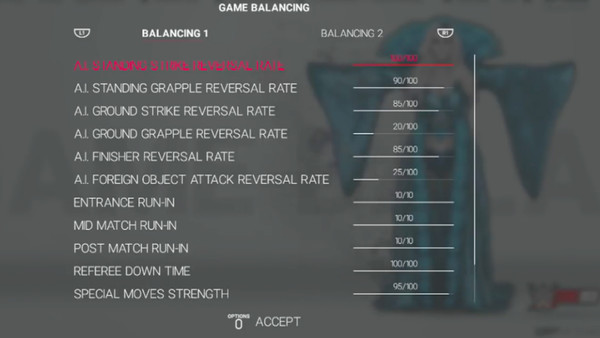
Put plainly, the AI in 2K19 is a cheating, reversal-spamming bastard. It'll lure you into a comfort zone by taking a kicking and impossibly rolling out of the way before that top-rope Randy Savage elbow can connect. Then, as if that wasn't enough, it'll steal your finisher and the win despite having 0% health left.
If you've ever been in that position, then rejoice. There's a way to remedy the pain and ensure matches go how you want them to.
In the options menu, select 'Gameplay' and 'Game Balancing'. There, prepare to giggle like a movie villain as you remove the CPU's ability to reverse finishers at all and ensure swinging a steel chair connects with their skull every time. It's cheating, but they started it.
In all seriousness, this excellent feature (one 2K have had for a few years now) is something they never make a lot of noise about. For those seeking a more realistic WWE match experience, there are slider details available online. Others who prefer an arcade-y style, you're covered too.
7. Target Specific Body Parts

Back in the olden days, THQ introduced a subtly brilliant mechanic to their SmackDown vs. Raw Series. In Here Comes The Pain, a little mannequin could be seen down next to your character's status bar, and it let you know which parts were damaged. This went hand-in-hand with the limb targeting system.
By holding one of the shoulder buttons and then pressing one of the face buttons, it was possible to direct attacks at the head, left arm, right arm or legs respectively. Guess what? It still is, and yet nobody is talking about this tactical masterclass in basic wrestling psychology.
On PS4, hold down R1 then choose from triangle (head), square (left arm), circle (right arm) or X (legs) to dish out the punishment as you see fit; it's RB and Y, X, B and A on Xbox One. This is one seriously overlooked game plan when playing as a wrestler who uses submissions as a signature move or finishing hold.
Sadly, there's no button for dinging someone in the balls like Shinsuke Nakamura does.
6. Turn Off Reversal Limitations

Before explaining this one, it's important to state (for the record) that 2K are trying to keep matches flowing back and forth by restricting the amount of times each superstar can reverse strikes and grapples. We get that, but it's bloody annoying, and it's the kind of thing that ups frustration levels mid-match.
Kill it, kill it with fire. Or just turn it off completely in the options menu.
This is another optional gameplay element 2K keep hidden. So, if you don't think it's fair that Billie Kay should have to wait until her reversal bars fill up slowly before she can block another forearm smash from MMA bad ass Ronda Rousey, remove the mechanic from your game.
Suddenly, being able to reverse at will becomes joyful, and it becomes more fun with friends. If you combine that with a few tweaks on the gameplay sliders menu to keep things fair, matches can still have some back and forth action without waiting for little orange meters to turn yellow.
5. Practice Play Without An Opponent
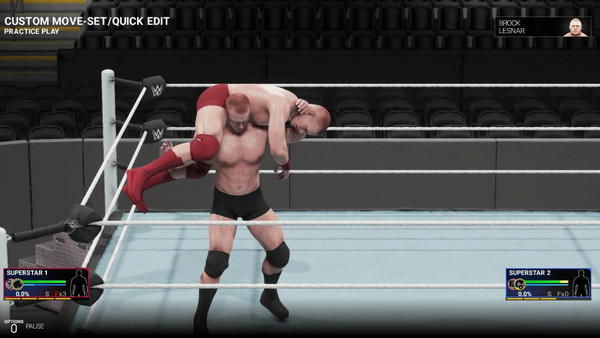
Unless you have the patience of a saint, it's much better to assign a pre-set move list to each CAW and quickly get to the actual matches. After all, painstakingly deciding every single strike combination can be a tad laborious, and some will see it as a waste of time.
Hold your horses there, cowboy, because the custom move set area in 2K19's creation suite has another, less dull purpose. It's the ideal place to practice all the game's controls without fear of an opponent who will fight back and reverse everything in sight.
In other words, it's the best way to introduce a pal to the game's many button contexts. Just let them fiddle around for a while and they'll be pulling off springboard dives and rebound finishers in no time.
Another quick tip: if you're ever unsure how to pull off a signature move or finisher mid-match, press pause and explanations will be right there in the menu. This is handy in a pinch during Extreme Rules or Falls Count Anywhere matches that spill outside the ring.
4. Update Superstar Attires
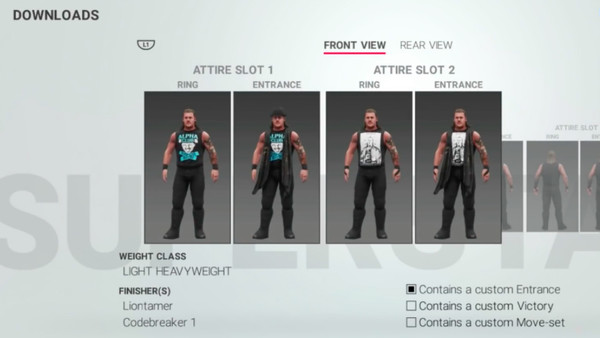
Why settle for 2K's dated character models and attires when leaping onto the Community Creations tab for a quick update is so easy these days? Don't be fooled into thinking the downloads section is full of CAWs created from scratch either. It's not. In fact, there are loads of downloads that still use 2K's pre-rendered wrestlers.
All the people responsible are doing is building updated costumes for the stars in question, and God bless them for doing it.
After downloading, it's wise to head into the creation suite and choose 'Edit WWE Superstar'. That enables a swift replacement of attires you maybe don't like or feel are outdated with ones that have been downloaded from creators. It's presumably why everyone has an 'Attire Slot 2'.
Keep this in mind the next time one of your favourites debuts some new gear on Raw, SmackDown or NXT. Unlike the old days when gamers had to settle for whatever the developer put on-disc, Community Creations has your back and means outdated characters should be a thing of the past.
3. Get Everything Instantly
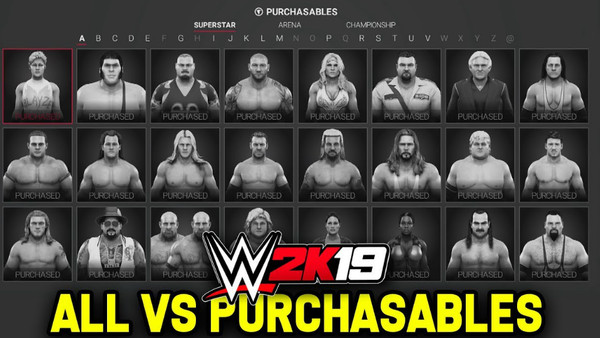
It's such a chore to build up a respectable amount of VC in 2K19. For example, most wrestlers in the purchasables section cost around 5,000, meaning you're gonna' have to grind through endless matches just to get hands on Steve Austin. A good idea in theory, but tedious as all hell in practice.
Use real money instead.
OK, so encouraging players to splash the cash for stuff that should already be included is bogus, and it has become a cancer of the video game industry. Without veering off on a tangent about that, it does suck. Regardless, spending another few quid (£3.99 in the UK) will unlock every single name on the purchasables screen, and that's not all.
Buy the 'Accelerator Pack' and you'll be able to change in-game superstar stats to your liking too. Some won't like this even being here, but there are others who don't want to wait and don't see another mini-payment like this as a big deal if it saves them bags of time in the long run.
2. Put An Opponent Through The Elimination Chamber Pods

It'd be nice to know what ex-ECW announcer Joey Styles thinks about his trademark exclamation, "Oh My God" still being part of WWE's product. In 2K19, it takes the form of 'OMG Moments' like Powerbombing a helpless fool through the announce desk or smashing them through the side of a Steel Cage.
One of the most forgotten about 'OMGs' involves the "bullet proof glass" (according to good ol' JR anyway) that secures each Elimination Chamber pod. In this year's game, it's still possible to hurl opponents through it, and there are a few ways to see this violent spot.
The best is picking Braun Strowman and throwing someone back first into the pane. Another is using a character with a Spear as their finisher (Edge, Goldberg, Roman Reigns etc), laying the CPU up against the window and then running full force into them.
Holding R1/RB and pressing triangle/Y will trigger one of the OMG moments provided you have one finisher stored and at least 50% stamina left. It's endless fun to smash all four pods and pin each victim after they've gone through the glass.
1. Play A Solo Superstar Career In Universe Mode

Finally, there's the much-maligned Universe Mode.
2K have improved some parts of Universe in 2K19. Playing God is easier now we can pick who wins what matches when simulating, and there seems to be a much more realistic flavour to some of the feuds that randomly start (no more instances of lowly names going from mid card to main event within one month).
In the absence of a full Story Mode that lets fans play as their on-screen faves, Universe will have to do. Fear not, dear reader, because you can still have a good time. There's no need to play every match or pretend Universe is the WWE sandbox 2K present it as. Instead, pick one superstar and decide their fate.
This is actually the most fun way to play the mode. Best of all, being able to choose who wins elsewhere makes it easier to mould the entire product around your man/woman. Form alliances, turn your back on partners, win titles and beat the champions you want to beat. That's how it should be.
What returning features are you enjoying most in WWE 2K19? Let us know down in the comments section below!